Emmet for HTML
What is Emmet?
Emmet has made HTML and CSS superfast.
You have to type a expression then it converts it into a proper code.
Even if you want design a small webpage you have to type multiple line that too results in several typing mistakes.
HTML without Emmet
Before emmet, developers typed each and every tag by hand which was time consuming.
They had type opening and closing tags, also they would have to remember correct nesting, had multiple typing errors.
Why Emmet is useful for HTML beginners?
As given above, emmet helps to save time, increase productivity, don’t need to type repetitive tags. As a beginner they can forget proper nesting, or to close tags. Therefore, it is very useful for beginner emmet will take care of above things and beginners can focus on learning concepts.
How emmet works inside code editors?
Code editors that support Emmet are:
1.VS Code (Visual Studio code)- Emmet is built-in by default
2.Sublime Text - It supports Emmet through plugin (you have install Emmet package).
3.Atom - Emmet is built-in by default
4.Notepad++ (Emmet via plugin)
As we have seen in the beginning of this blog, you do not need to type entire code, you can use shortcuts. When you type an Emmet abbreviation, press Tab or Enter, emmet converts it into HTML code.
Basic Emmet Syntax and abbreviations:
When you type p emmet converts it to <p></p>
<p></p>
When you type div
<div></div>
Observe the below table
| Symbol | Meaning |
| \> | Child Element |
| + | Sibling Element |
| * | Multiple Elements |
| . | Class |
| # | ID |
When you type div>p
<div>
  <p></p>
</div>
Type h1+p
<h1></h1>
<p></p>
To repeat elements
li*4
<li></li>
<li></li>
<li></li>
<li></li>
To add a class
type div.box
<div class="box"></div>
To add an id
type section#main
<section id="main"></section>
To add attributes
img[src=”logo.png” alt=”logo”]
<img src="logo.png" alt="logo">
Nesting in Emmet
let us type, div>ul>li*2
<div>
  <ul>
    <li></li>
    <li></li>
  </ul>
</div>
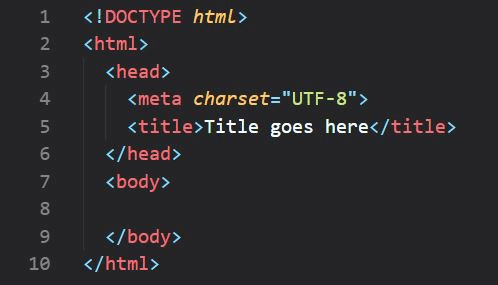
When you use ‘! ‘ in html file, you get whole template.
Conclusion
Therefore, we can say that Emmet saves time, instead of typing tags again and again we can use emmet abbreviations. It makes HTML easy for beginners. It improves productivity.
Comments
Join the discussionNo comments yet. Be the first to comment.


