How a Browser Works: A Beginner-Friendly Guide to Browser Internals
A browser is a software application that allows you to access and view websites on the internet. When a user requests a web page from a particular website, the browser retrieves its files from a web server and then displays the page on the user's screen.
It retrieves web pages, displays text, images, and videos, and lets you interact with online content.
How do Browsers Work?
You enter a website address (URL) or click a link.
The browser sends a request to the website’s server.
The server responds by sending the webpage’s data (HTML, CSS, JavaScript, images, etc.).
The browser processes this data and displays the webpage.
You can interact with the page by clicking, scrolling, or entering information.
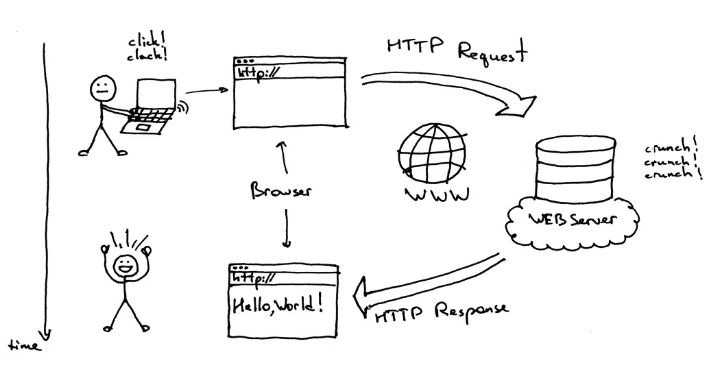
Step 1: The process begins with Domain Name System (DNS) resolution, where the browser translates the domain name into an IP address to locate the server where the web page is stored.
Step 2: The browser then sends an HTTP request to the server, specifying the path and parameters of the requested resource.
Step 3: Once the server receives the request, it sends an HTTP response to the browser containing the requested resource in HTML, CSS, and JavaScript code.
Step 4: The browser’s rendering engine interprets and renders the code to display the web page on the user’s device.
Step 5: The CSS stylesheets are applied to format the web page’s content, including fonts, colors, and layout.
Step 6: The browser may also execute JavaScript code on the web page to add interactivity and dynamic behavior.
Step 7: As new content is loaded or changes are made to the web page, the browser updates the display accordingly.
Features of a Browser
Most browsers include standard features such as:
A home button to return to a designated homepage
An address bar to enter web URLs
Back and forward buttons for page navigation
A refresh button to reload pages
Stop to halt page loading
Tabs for multiple websites in one window
Bookmarks for saving frequently visited sites
Many browsers support plug-ins to enhance functionality, like adding security features or new capabilities.
Components of a Browser
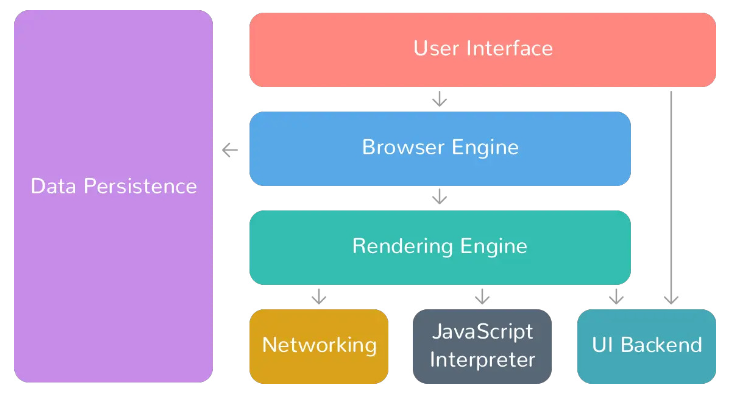
Web Browsers consist of 7 different components listed below:
1. User Interface
This component allows end-users to interact with all visual elements available on the web page. The visual elements include the address bar, home button, next button, and all other elements that fetch and display the web page requested by the end-user.
2. Browser Engine
It is a core component of every web browser. The browser engine functions as an intermediary or a bridge between the user interface and the rendering engine. It queries and handles the rendering engine as per the inputs received from the user interface.
The performance and features of a browser engine can greatly impact the user experience of a web browser. A fast and efficient browser engine can help web pages load quickly and smoothly, while a slower or less capable engine may struggle to render complex pages or provide a smooth browsing experience.
3. Rendering Engine
As the name suggests, this component is responsible for rendering a specific web page requested by the user on their screen. It interprets HTML and XML documents along with images that are styled or formatted using CSS, and a final layout is generated, which is displayed on the user interface.
Note: Every browser has its own unique rendering engine. Rendering engines might also differ for different browser versions. The list below mentions browser engines used by a few common browsers:
Google Chrome and Opera v.15+: Blink
Internet Explorer: Trident
Mozilla Firefox: Gecko
Chrome for iOS and Safari: WebKit
4. Networking
This component is responsible for managing network calls using standard protocols like HTTP or FTP. It also looks after security issues associated with internet communication.
5. JavaScript Interpreter
As the name suggests, it is responsible for parsing and executing the JavaScript code embedded in a website. Once the interpreted results are generated, they are forwarded to the rendering engine for display on the user interface.
6. UI Backend
This component uses the user interface methods of the underlying operating system. It is mainly used for drawing basic widgets (windows and combo boxes).
7. Data Storage/Persistence
It is a persistent layer. A web browser needs to store various types of data locally, for example, cookies. As a result, browsers must be compatible with data storage mechanisms such as WebSQL, IndexedDB, FileSystem, etc.
When users type a URL, click links, or utilize features, the front-end requests necessary resources from the back-end. The back-end processes these resources and sends the rendered content back to the front-end for display. This enables smooth navigation and interaction with online content.
Apart from these two major elements, here are the components of a browser.

Comments
Join the discussionNo comments yet. Be the first to comment.


